¶ 4.1 Startup & Shutdown
This air assist system features start-stop interlock control with the laser equipment:
The air assist system automatically activates / deactivates when the laser equipment is started / shut down. If the laser equipment has no active processing task, the air assist system stops air supply.
¶ 4.2 Digital Pressure Gauge
¶ 4.2.1 Panel Overview
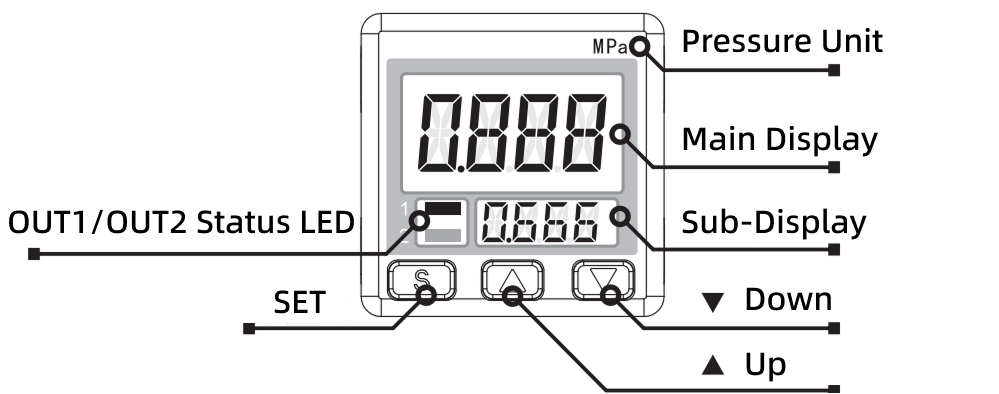
¶ 4.2.2 Function & Usage
The digital pressure gauge within this Air Assist Kit has undergone precision calibration prior to shipment. Users must not disassemble or recalibrate the gauge.
The gauge provides real-time, continuous display of the pressure value detected by the sensor. When system pressure is stable with minimal fluctuation, the gauge reading will remain clear and steady.
Important:
If you observe that the digital pressure gauge only displays up to 0.5 MPa when using a 0.6 MPa air supply, this is a normal occurrence. Pressure reduction occurs as the air enters the system, and this level of drop falls within the expected range.
¶ 4.2.3 Output Display & Error Codes
During normal operation, the gauge continuously displays the real-time air pressure value. Upon detecting a system abnormality, the screen will display one of the following error codes:
|
Error Display |
Error Description |
|
 |
Abnormal current consumption on switch output |
|
 |
Pressure applied during zero-point calibration |
|
 |
Pressure value exceeds measurement range |
|
 |
Internal Error |
|
 |
Internal Error |
If an error code appears:
DO NOT force continued operation. This may damage the laser equipment and Air Assist Kit. Please contact after-sales support personnel for resolution.
¶ 4.2.4 Safety Precautions
- Gas Compatibility: Use ONLY with non-corrosive gases. STRICTLY PROHIBITED for use with corrosive gases, flammable gases, or any liquids.
- Physical Handling: The gauge must not be subjected to dropping, impact, or severe shock. Such events may cause permanent damage to internal precision components, resulting in gauge failure.
- Input Pressure Limits: Input pressure MUST remain strictly within the specified pressure and rated voltage limits. Exceeding the upper limit will cause damage to the pressure gauge and related internal components.
- Operating Environment: DO NOT use the gauge in environments with excessive moisture, oil mist, dust, or other contaminants. Contaminant ingress can lead to internal air path blockage, corrosion of precision parts, or functional failure.
¶ 4.3 Controlling Air Assist Pressure Modes
The Air Assist Control supports controlling the auxiliary air pressure in two modes: High Pressure and Low Pressure. The air pressure settings for each mode are independent. You can control the Air Assist Control's operating mode via the following methods:
- Automatic Control via Device Processing: When the device is processing a design, it automatically controls the Air Assist Control's operating mode based on the air assist settings defined in the design layers.
- Manual Control: When the device is not in processing mode and manual control mode is inactive (both button LEDs are off), press the High-pressure air test button or the Low-pressure air test button to manually control the Air Assist Control's operating mode.
¶ 4.3.1 Setting Air Assist Control Mode in Design Software
After correct installation, the device will automatically set the Air Assist Control's pressure mode based on the air assist switch settings defined in the design layers:
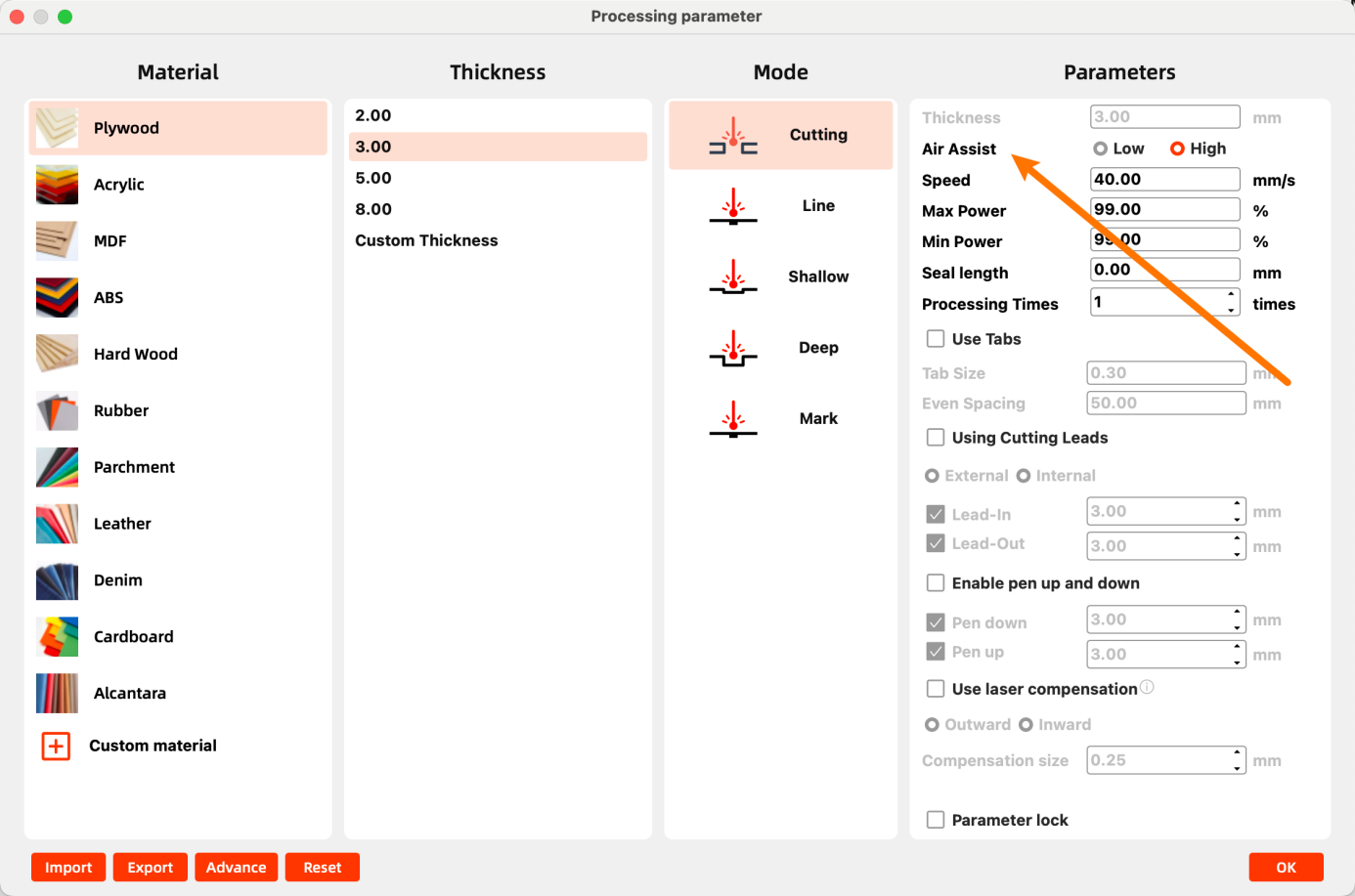
- Using MakerBoost: Double-click the design layer. In the pop-up window, set Air Assist to Low or High. Selecting High sets the layer for High-Pressure air assist. Selecting Low sets the layer for Low-Pressure air assist.
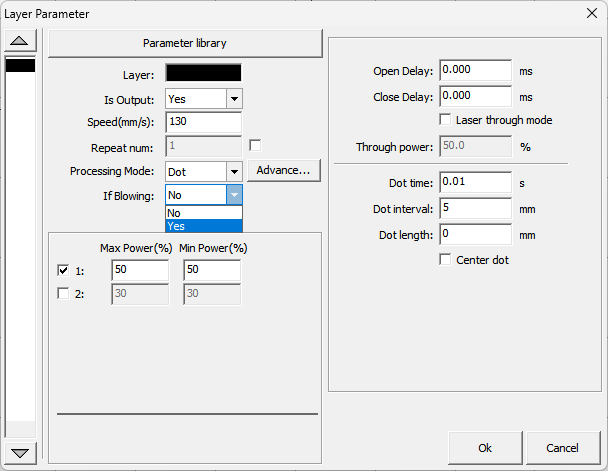
- Using RDWorks: Double-click the design layer. In the pop-up window, set If Blowing to Yes to enable High-Pressure air assist for that layer. Setting it to No enables Low-Pressure air assist.
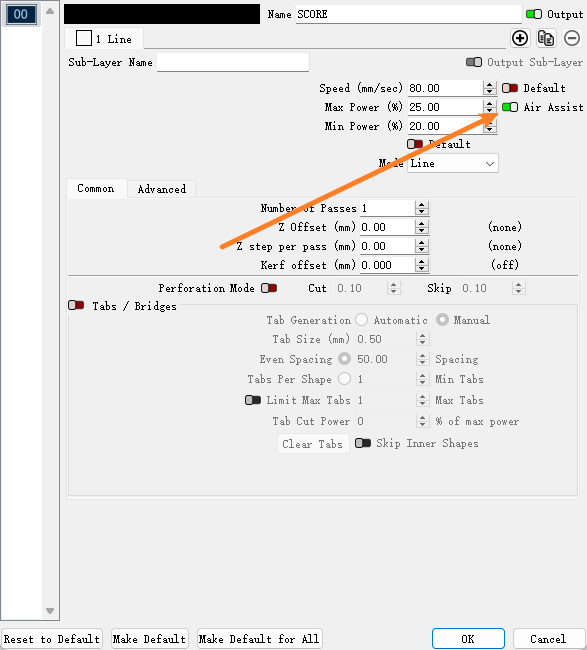
- Using LightBurn: Double-click the design layer. In the pop-up window, set Air Assist to On to enable High-Pressure air assist for that layer. Setting it to Off enables Low-Pressure air assist.
¶ 4.3.2 Adjusting High-Pressure Air Assist
- Ensure only the High-pressure air test button LED is illuminated.
- If the LED is off, press the button or ensure the device is processing with the current layer set to Air Assist ON (High).
- Pull up the High-pressure air adjustment knob to disengage its lock.
- Rotate clockwise to increase High-Pressure air assist. Rotate counterclockwise to decrease High-Pressure air assist.
- Observe the value on the digital display until the desired pressure is reached.
- Push down the knob to re-engage its lock.
¶ 4.3.3 Adjusting Low-Pressure Air Assist
- Ensure only the Low-pressure air test button LED is illuminated.
- If the LED is off, press the button or ensure the device is processing with the current layer set to Air Assist ON (Low).
- Pull up the Low-pressure air adjustment knob to disengage its lock.
- Rotate clockwise to increase Low-Pressure air assist. Rotate counterclockwise to decrease Low-Pressure air assist.
- Observe the value on the digital display until the desired pressure is reached.
- Push down the knob to re-engage its lock.
¶ 4.3.4 Low-Pressure Operation Protection
Typically, higher air pressure is used for cutting operations, while lower pressure yields better results for engraving operations. You can adjust the air pressure to meet specific requirements via manual knob adjustment or by changing the air assist mode in your design.
Critical Protection Mechanism:
- When air assist pressure is too low (supply pressure < 0.3 psi / ~2.07 kPa) or air supply is interrupted, the airflow from the laser nozzle may be insufficient to protect the lens and nozzle from smoke and debris contamination.
- Under these conditions, the Air Assist Control will automatically halt operation and may display a warning message on the screen.
- Re-adjust the corresponding pressure adjustment knob until the pressure display returns to a green (normal) indication, then resume processing.
¶ 4.4 Troubleshooting
If the following issues occur during use, contact After-Sales Service:
|
Symptom |
Possible Cause |
|
Pressure reads 0 / No airflow |
Main gas supply valve closed / Air hose kinked or detached / Filter blocked |
|
Abnormal pressure fluctuation |
Insufficient source pressure / Air filter regulator malfunction |
|
Abnormal noise |
Accumulated dust in cooling fan / Overload from continuous operation |
|
Digital gauge black screen |
Power disconnected / Loose display ribbon cable |