¶ Laser Head Fails to Return to Origin After Job Completion
This guide explains how to fix situations where the laser head does not return to the origin point after a processing job is completed. If the laser head stays at the final job position or moves to the machine zero point instead of the user-defined origin, the issue is typically caused by an incorrect Return Position setting in LightBurn.
¶ Problem Description
After a processing job finishes, the laser head does not return to its origin point. Instead, it moves to the machine zero point or remains stationary at the final coordinates of the completed job.
¶ Cause
The return position setting has been modified to a different location.
¶ Solution
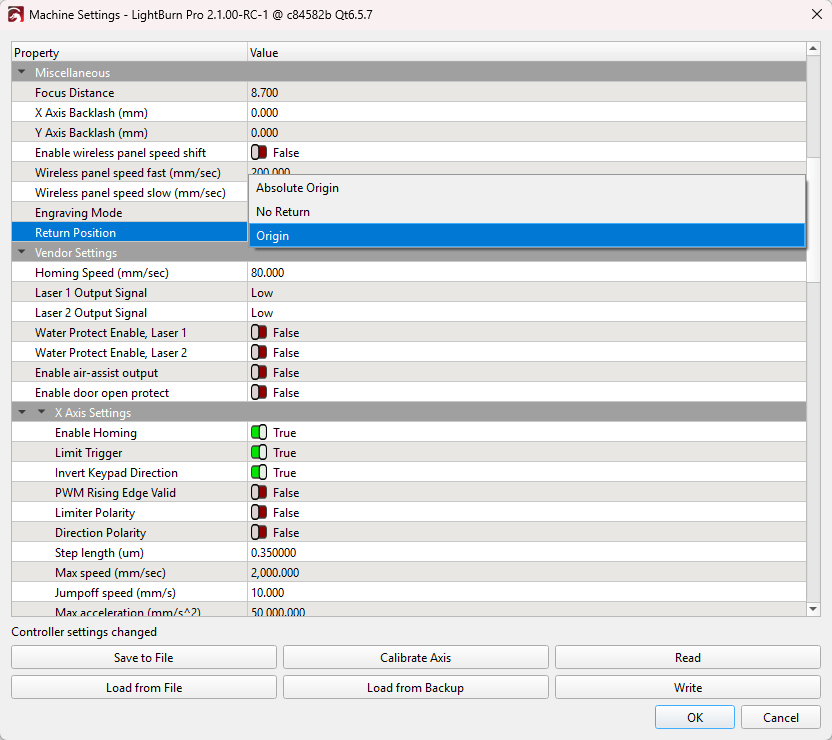
Open Lightburn > Machine Settings, locate the Return Position parameter, and verify that the option is correctly set to "Origin".
After making the selection, you must click "Write" to save the changes to the machine's controller.
Important Reminder:
If these steps do not resolve the issue, please click this link to submit a support ticket: https://zohodesk.1laser.com/portal/en/newticket. A technician will then be able to conduct a more in-depth diagnosis and resolve your problem.