¶ Axis Driver Indicator Light is Red and Flashing - X Series
This page explains how to diagnose and resolve issues when an axis driver indicator light turns red and flashes. It covers what the flashing patterns mean, why the driver enters protection mode, and how to safely restore normal machine operation.
¶ Problem Description
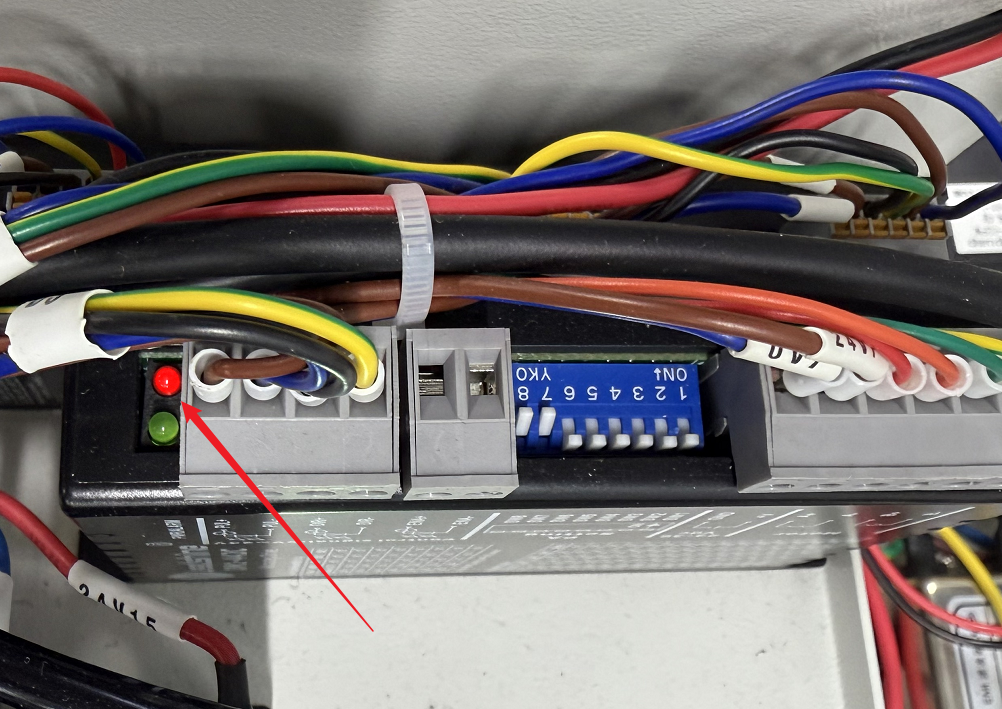
Remove the right-side cover panel to locate the axis drivers. Under normal operating conditions, the status indicator light on the driver should be solid green. If the red indicator light begins to flash, it indicates an abnormality with the driver or motor position.
¶ Cause&Solution
Please refer to the table for the corresponding questions and solutions.
|
Red Light Flashes |
Protection Function |
Cause |
Solution |
|
1 Flash |
Overcurrent / Short Circuit |
A short circuit or wiring error has occurred in the motor or driver, triggering overcurrent protection. |
Power off the equipment, inspect the motor wiring for the corresponding axis, and then power the equipment back on. |
|
2 Flashes |
Overvoltage Protection |
The driver enters protection mode when the voltage exceeds 40 V DC. |
Power the equipment off and then back on. If this occurs frequently, consider slightly reducing the input power supply voltage. |
|
4 Flashes |
Phase Loss Protection |
The driver was powered on without a motor connected, or there is a current imbalance, excessive current, or motor coil overheating. |
Power off the equipment, inspect the motor wiring for the corresponding axis, replug the connectors, and power back on. |
Important Reminder:
If these steps do not resolve the issue, please submit a support ticket on ZOHO: https://zohodesk.1laser.com/portal/en/newticket. A technician will then be able to conduct a more in-depth diagnosis and resolve your problem.