¶ RF Tube Stops Firing Mid-Job and Resumes After a Delay - X Series
This troubleshooting guide explains why your X Series RF laser tube may temporarily lose power mid-operation and provides step-by-step methods to resolve overheating issues, restore continuous beam output, and complete your processing jobs without interruption.
¶ Problem Description
During cutting, the laser suddenly stops emitting a beam and then randomly resumes firing later, leaving parts of the job incompletely cut. This issue frequently occurs when a job is 80% to 99% complete, though the exact timestamp varies every time.
- Example: A recent job running at 5 mm/s speed and 100% power (100% continuous output for roughly 30 minutes) experienced this mid-process beam drop.
¶ Cause
- Unsuitable Ambient Environment: The surrounding room temperature exceeds the operating threshold for the air-cooled RF laser tube.
- Thermal Overload / Overheating: Prolonged operation at maximum power generates excess thermal energy faster than the cooling fans can dissipate it. The RF tube enters a temporary thermal protection shutdown mode until internal temperatures cool down.
¶ Solution
¶ Method 1. Verify and Regulate Ambient Temperature
Check the temperature of your workspace. RF laser tubes require an ambient operating temperature strictly between 0℃ and 35℃ (32℉ to 95℉).
Users operating in garages, unconditioned sheds, or hot summer environments easily exceed these safe limits. If the machine cannot be moved to a temperature-controlled environment, avoid running long-duration jobs at 100% full power.
Manufacturer Environmental Specifications:
| Operating Temperature | 0-35℃ (32-95℉) |
| Operating Humidity | ≤95% (Air-cooled, non-condensing) |
| Operating Altitude | ≤2000m |
* Data retrieved from the official RF tube manufacturer manual.
¶ Method 2. Maximize Cooling Fan Power
¶ Step 1. Inspect Diagnostic LED Indicators
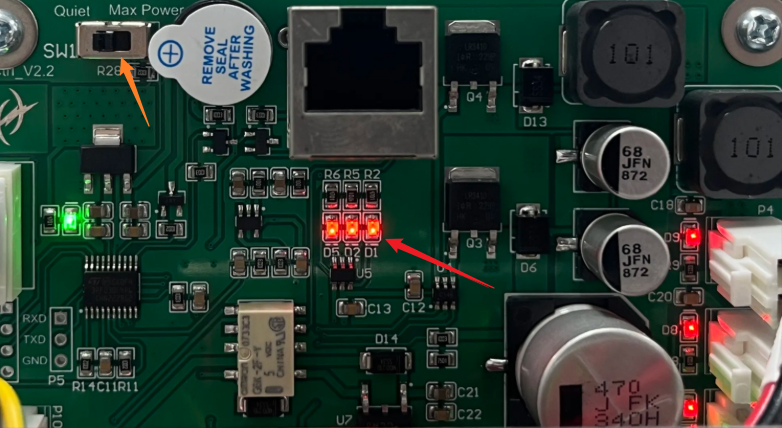
When the laser beam cuts out mid-job, open the rear access panel of the machine to locate the Fan Control Board. Check whether the D1, D2, or D5 diagnostic LEDs are illuminated.
¶ Step 2. Adjust Fan Speed Mode
An illuminated D2 LED indicates that the RF tube has reached an over-temperature state. Locate the fan speed toggle switch on the Fan Control Board and slide it all the way to the far right position to force the cooling fans to operate continuously at max power.
Re-run the processing job to verify if increased airflow resolves the thermal throttling and restores continuous laser output.
Important Reminder:
If these steps do not resolve the issue, please submit a support ticket on ZOHO: https://zohodesk.1laser.com/portal/en/newticket. A technician will then be able to conduct a more in-depth diagnosis and resolve your problem.