¶ Poor Processing Effect in Laser Cutting - X Series
Poor Processing Effect is a troubleshooting guide that helps users identify and resolve issues where laser cutting fails to cut through the material. This page explains the most common causes—from material conditions to optical path alignment—and provides practical inspection and adjustment steps to restore proper cutting performance.
¶ Problem Description
During laser cutting, the material cannot be cut through, even though the job appears to run normally.
¶ Solution
¶ Method 1. Material issues
The material surface is uneven, coated or has impurities that will affect the cutting effect.
Make sure the material surface is clean and flat, and pre-treat it if necessary.
¶ Method 2. The reflector or focusing mirror is completely damaged
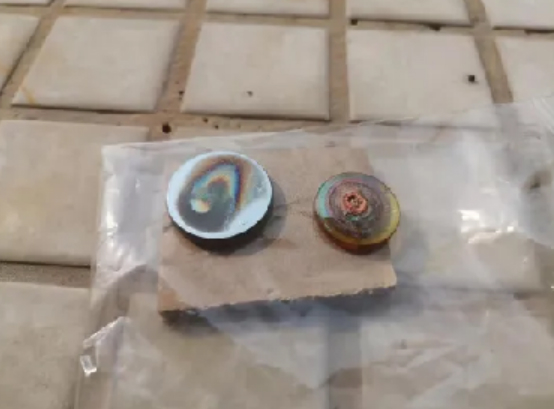
Failure to maintain the equipment on time may result in the reflector or focusing lens not being able to transmit or reflect light. Check whether the light path reflector and lens have good light transmittance.
¶ Method 3. Laser optical path deviation
The laser light path is offset, which will cause the laser to hit the inside of the laser head or the inside of the device, and the light cannot be emitted.
Please use double-sided tape to stick on the three-mirror frame, and press the point shooting to check whether the light spots of the five light source points in the platform overlap.
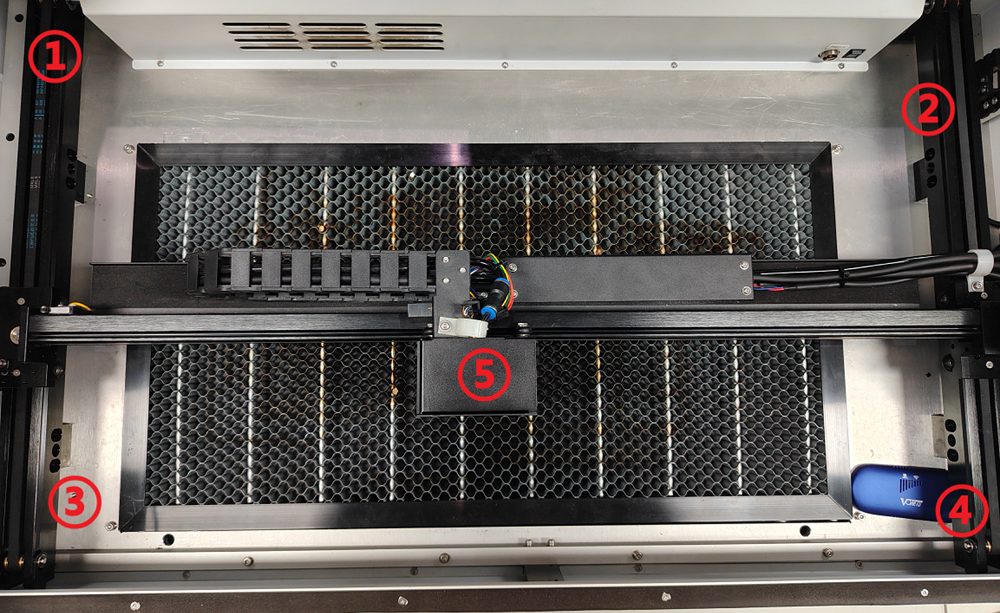
If there is an offset, please refer to the “How to adjust the laser light path”.
¶ Method 4. Incorrect focus adjustment
The bending of the material itself and the inconsistent height of the working area will cause different focal lengths at different positions in the cutting area, especially when cutting large-format patterns.
Please use a strong magnet to flatten the material and use a focusing ruler to check whether the height of each area of the working platform is consistent.
If it is not accurate, please use the focusing ruler to readjust the focal length.
¶ Method 5. Laser is weak or damaged
- The laser life has reached its limit, resulting in a decrease in light output power.
- The laser life is usually between 2500–4000 hours, and the specific life depends on the actual operating conditions.
Important Reminder:
If these steps do not resolve the issue, please submit a support ticket on ZOHO: https://zohodesk.1laser.com/portal/en/newticket. A technician will then be able to conduct a more in-depth diagnosis and resolve your problem.